Presale open: AI for ArchViz course · access from December 1Save my spot →
Skip to main content

Quadremy

Coming soon · Waitlist

Your AI studio,
on your own PC.

Quadremy Studio is a local app for ArchViz, interiors and real estate. It brings image enhancement, guided edits, video and image-to-3D together in one place, using ComfyUI and your own GPU. It’s not on sale yet: we’re finishing it and testing it on our own projects.

Runs on your PCYour files never leave your computerNo subscriptionInterface in Spanish and English
Pantalla de inicio de Quadremy Studio: ¿Qué quieres crear hoy?Real app screenshot · version in development
How it works

Choose the workflow, drag in the image
and review the result.

Choose your workflow

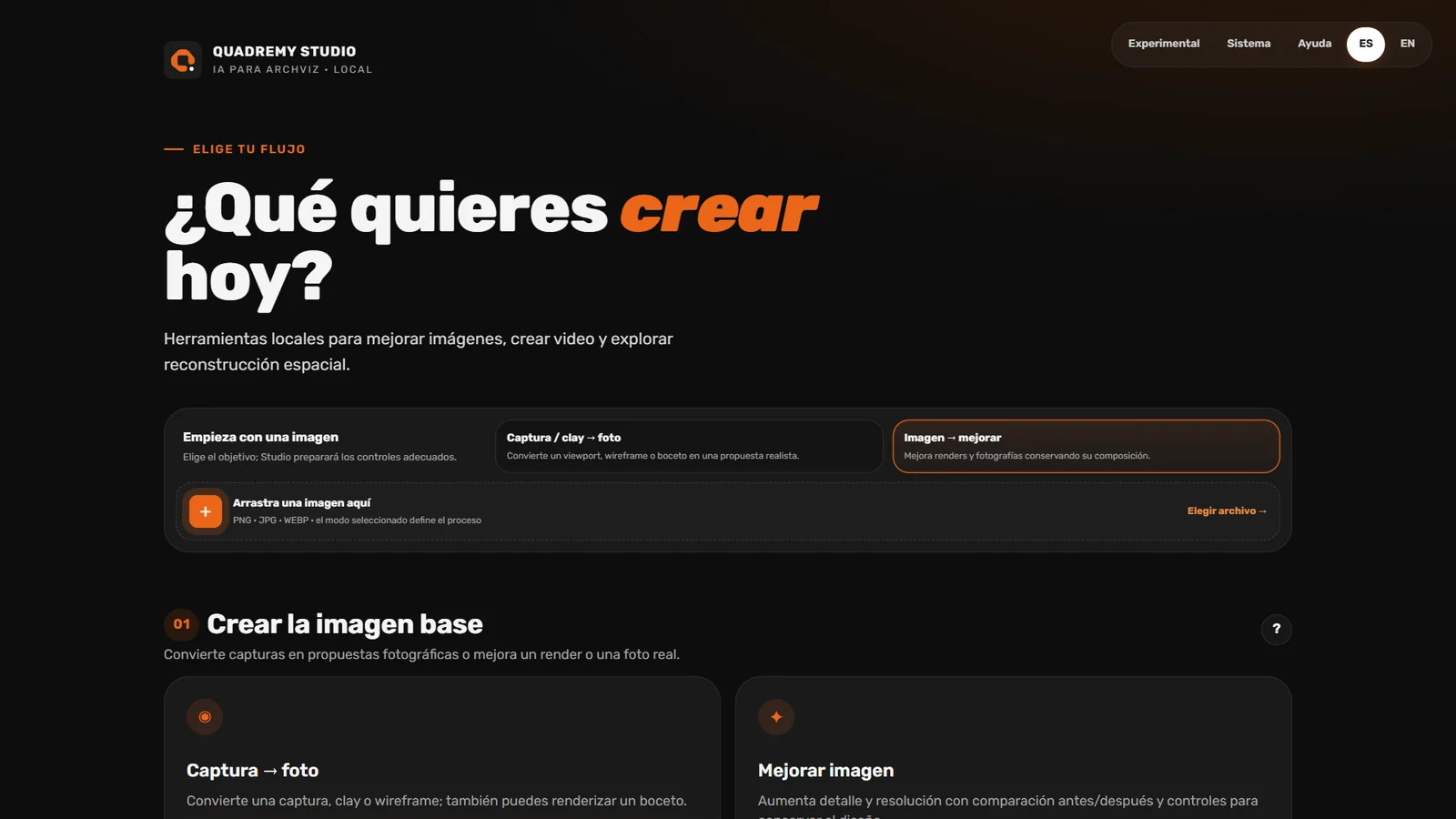
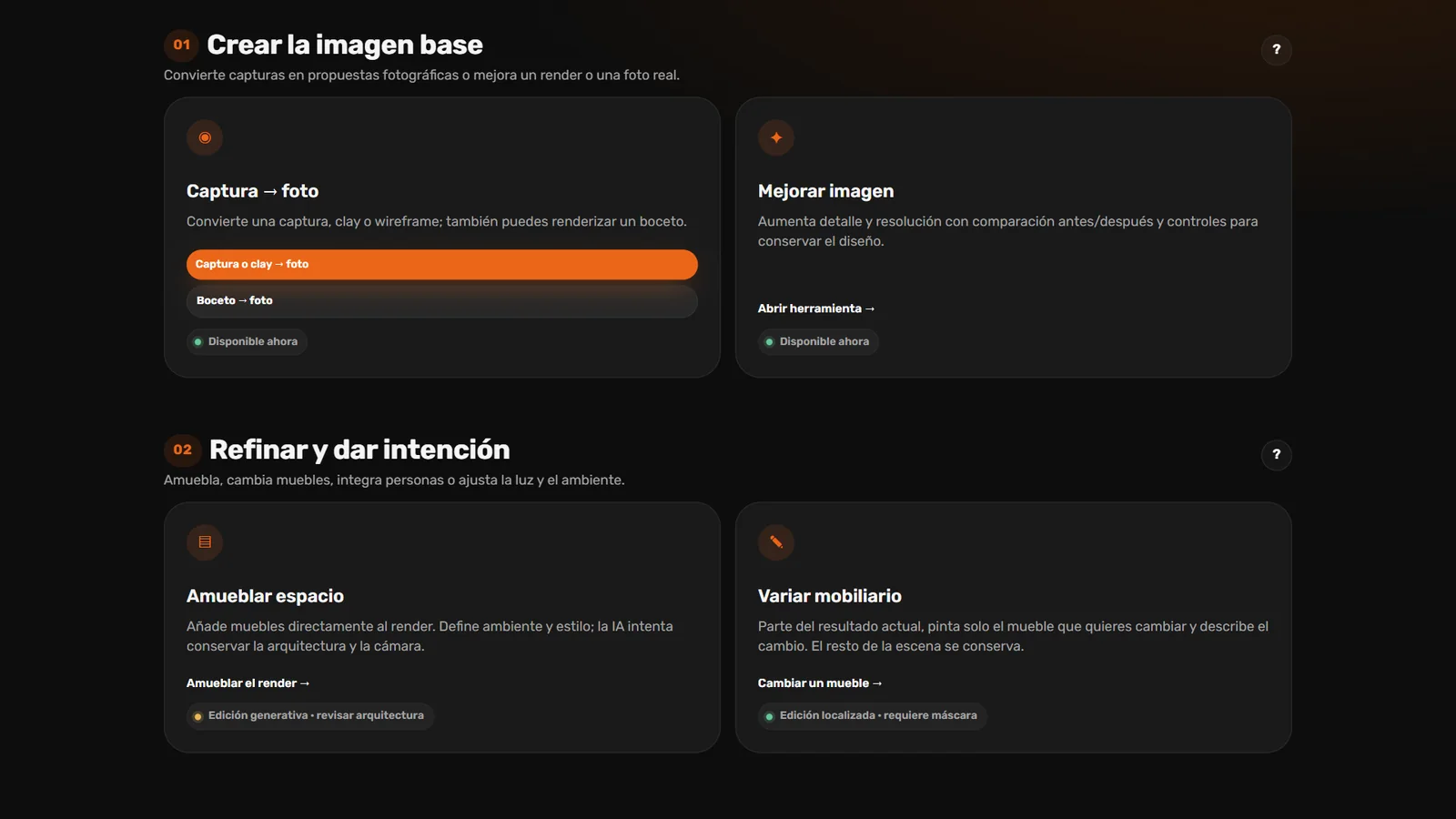
The home screen asks “What do you want to create today?” and groups the tools by stage: base image, refine, deliverables and 3D.

Drag in the image

A render, a photo, a viewport screenshot, a clay render or a sketch, as PNG, JPG or WEBP.

Adjust

The workflow sets up the controls: preset, lighting mood, prompt and final size x2 or x4.

Create and review

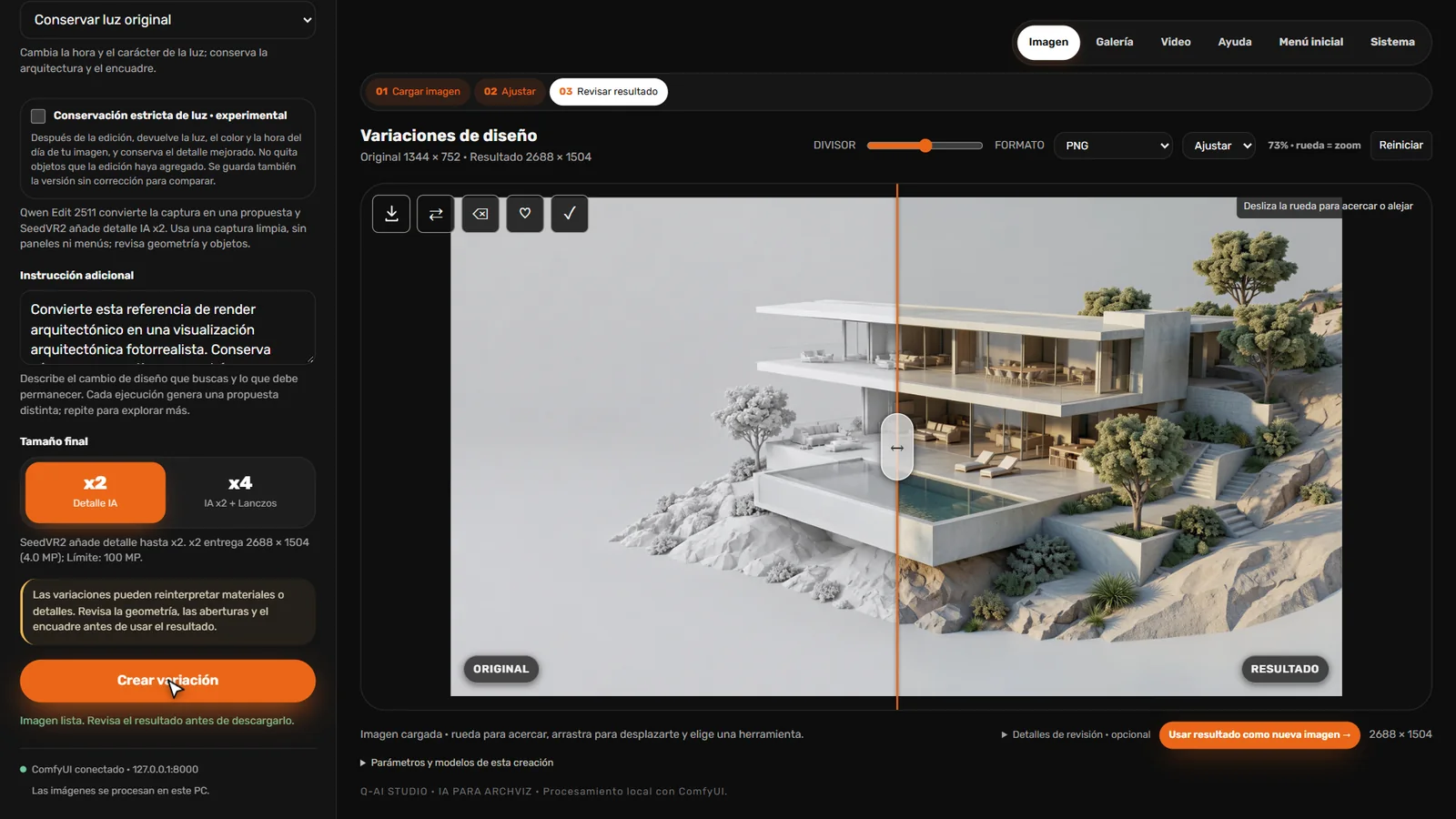
Your GPU processes it with a progress bar and a cancel button. Then you compare before and after with zoom.

Continue or deliver

Download the result or use it as the new image for the next step, for example a video.

The app is not out yet. The videos on this page are real recordings of the development build, using our own CUADRA LABS and Quadremy material. We only sped up the waiting times.

Each use, on video

Watch each workflow
from start to finish.

Works today

Screenshot or clay to photo

Turns a viewport, a clay render or a sketch into a photorealistic proposal that keeps the camera and framing.

  1. Choose “Screenshot / clay → photo” and drag in the image.
  2. Adjust the light or the prompt, if you want.
  3. “Create variation”: about 30 seconds on an RTX 5090.
  4. Compare with the slider and continue from the result.

Check: the geometry, openings and objects. Each run gives a different proposal.

Works today

Enhance image x2 or x4

Raises the detail and resolution of a render or a photo without changing the design. The Fidelity preset keeps the architecture.

  1. Choose “Image → enhance” and load the render.
  2. Choose x2 (AI detail) or x4 (AI x2 + Lanczos).
  3. “Enhance image”: in the test, from 1024 to 4096 px in about 10 seconds.
  4. Zoom to 200% and compare every area.

Check: x4 is the file size. AI detail goes up to x2; the rest is classic upscaling.

Works today

Change light and mood

Takes the same image to sunrise, golden hour, sunset, blue hour or night, aiming to keep the architecture and framing.

  1. Choose “Change light and mood” and load the image.
  2. Choose the time of day under “Lighting mood”.
  3. “Create lighting variation”: about 25 seconds.
  4. Compare it with the original before using it.

Check: fidelity: it may add haze, reflections or details that weren’t there.

Works today

Day → night

From a single daytime image, Quadremy Studio creates the night version and animates the transition with a locked camera.

  1. “Day → night” opens the video studio.
  2. Drag in the daytime image.
  3. “Generate video”: it first creates the night frame and then the transition.
  4. Review the clip, download it or enhance it to 1080p or 4K.

Check: the night image: lights and reflections are a proposal.

Works today

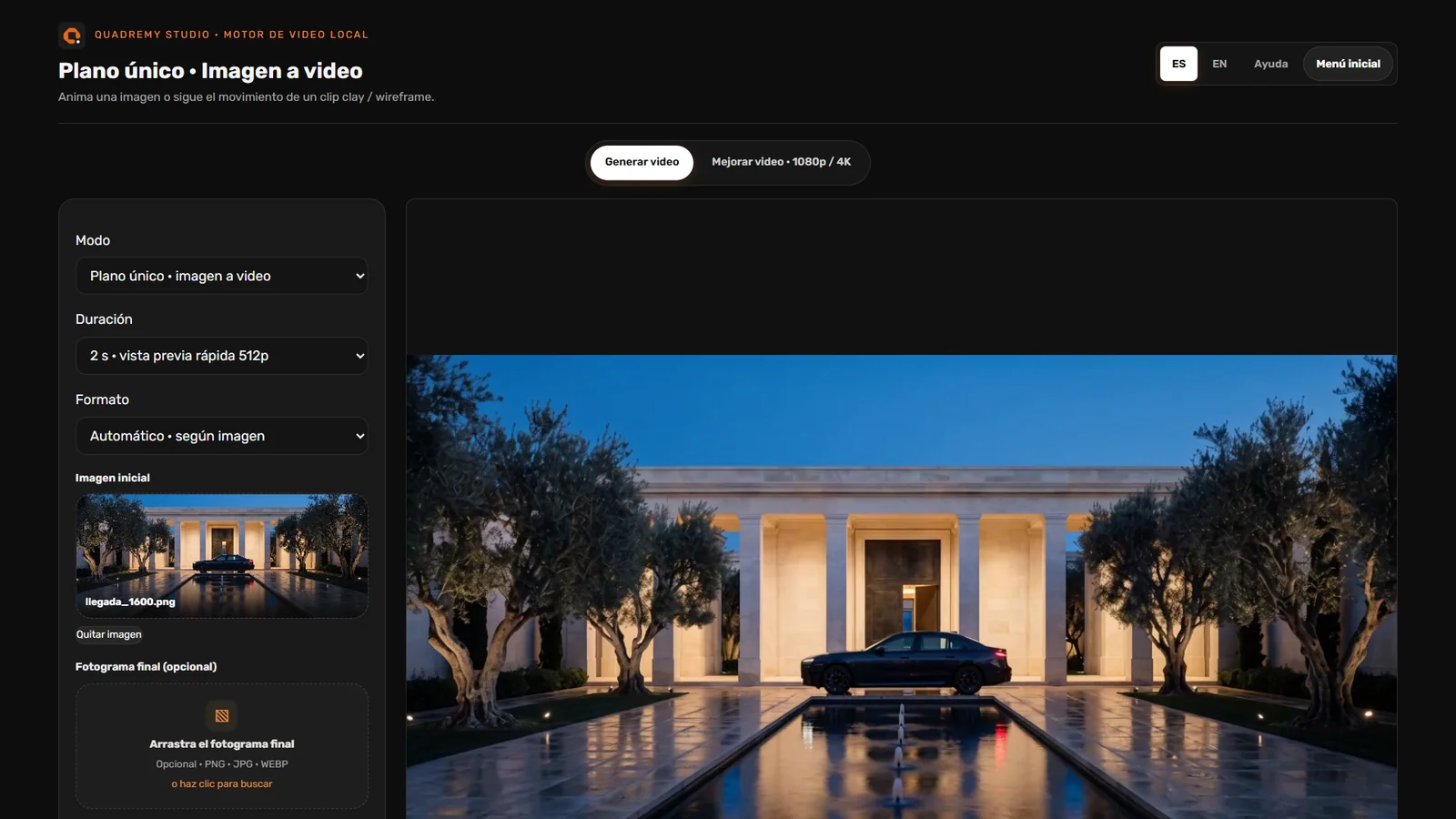
Image to video

A render or a photo becomes a shot with camera movement, generated with a local video engine.

  1. “Create or enhance video” and load the first frame.
  2. Choose 2 s (preview) or 5 s and the format.
  3. Describe the camera and the movement.
  4. “Generate video” and, if you like it, “Enhance video · 1080p / 4K”.

Check: that the geometry stays stable. It’s a single shot; tests used short clips.

Exploratory

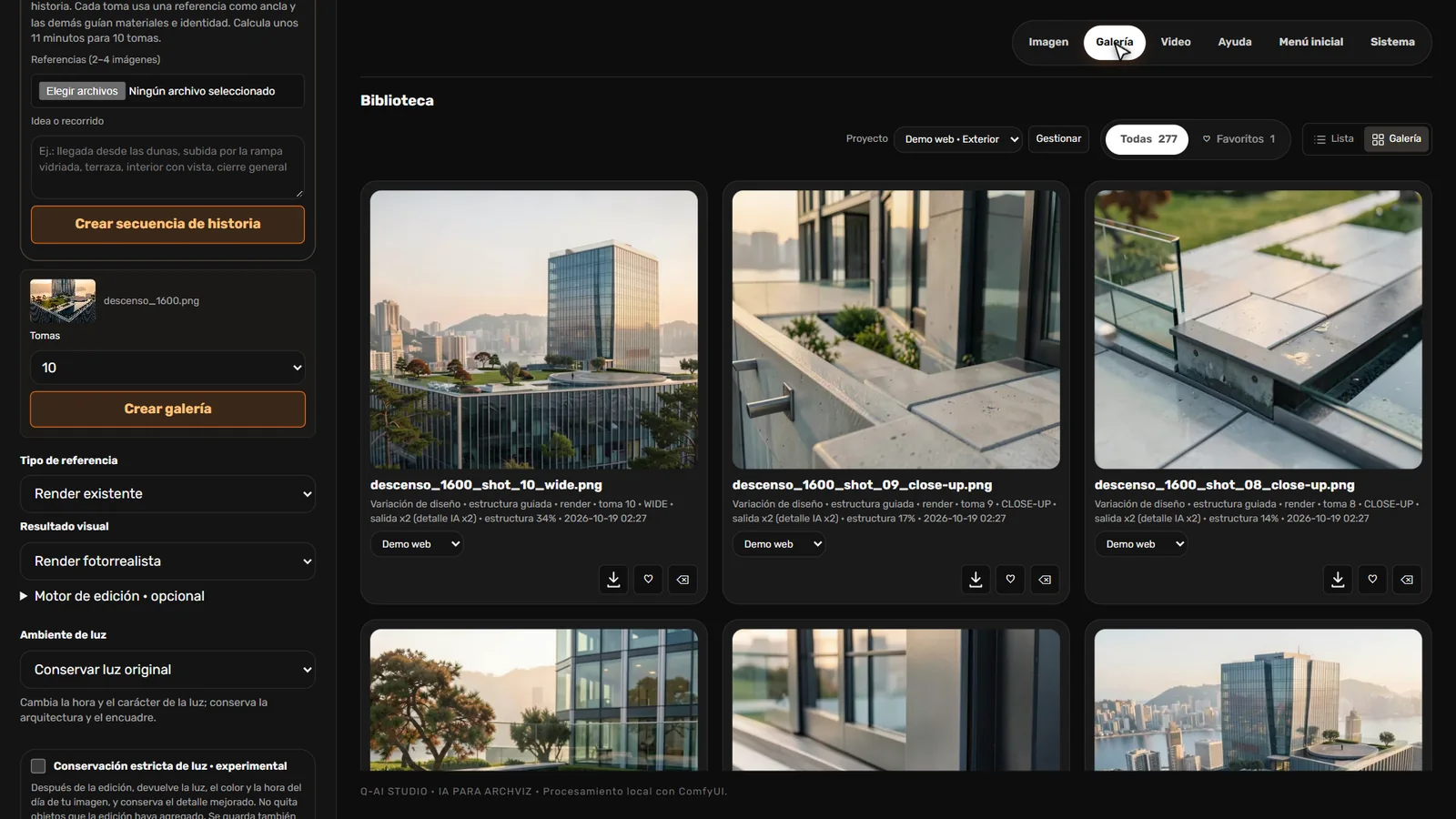
Editorial gallery

Ten or twenty new shots from a single image, to present a project or explore framings.

  1. Load the image and choose “Editorial gallery”.
  2. Choose 10 or 20 shots.
  3. “Create gallery”: each shot is generated separately and saved to the library.
  4. Keep the best ones and discard the rest.

Check: it’s exploratory. It can reinterpret the architecture and invent areas the camera didn’t show.

Everything it does

A complete ArchViz workflow,
in a single app.

This is where each tool stands in the development build. “Works today” means we already use it on our own projects; you still review every result before delivering it.

Works today

01 · Base imageEnhance image

Presets designed for architecture: Fidelity keeps the design, and the others tune the detail to each case.

  • x2 with AI detail or x4
  • Before/after comparison with zoom
  • Optional color speckle reduction
Works today

01 · Base imageScreenshot, clay or sketch to photo

A photorealistic proposal from the viewport, a clay render or a sketch, with the same camera.

  • Variations: white clay, sketch and physical model
  • Geometry is checked by eye
Works today

02 · RefineFurnish a space

An interior design proposal on an empty room, which you can then adjust piece by piece.

  • Vary furniture by painting just that area
  • Check scale and proportions
Works today

02 · RefineEdit an area

You paint a mask, write what you want to change and Quadremy Studio composites it onto your image.

  • Detection of cars, trees and people
  • Sky, vegetation, paving, materials
  • You review the patch before applying it
Assisted

02 · RefineAdd people

Adds people guided by a mask, with their location and type of space.

  • Woman, man or both
  • Always check the anatomy
Works today

02 · RefineChange light and mood

Sunrise, golden hour, sunset, blue hour or night on the same image.

  • Aims to keep the framing
  • Check how faithful the result is
Watch the video
Exploratory

03 · DeliverablesMoodboard and editorial gallery

A board with finishes, furniture and palette from your render, or 10 or 20 editorial shots to present.

  • Useful for exploring ideas
  • It may invent angles the camera didn't show
Watch the video
Works today

03 · DeliverablesVideo

From render to clip, on your PC: image to video, day to night and enhancement to 1080p or 4K.

  • Horizontal 16:9 or vertical 9:16 format
  • Tested with short clips
  • Each workflow with its status, in the Video section
See the video workflows
Works today

SpecializedImage to physical model

Turns a reference into a physical presentation model.

  • Wood, foam board or grey board
  • Check the structure of the result
Works today

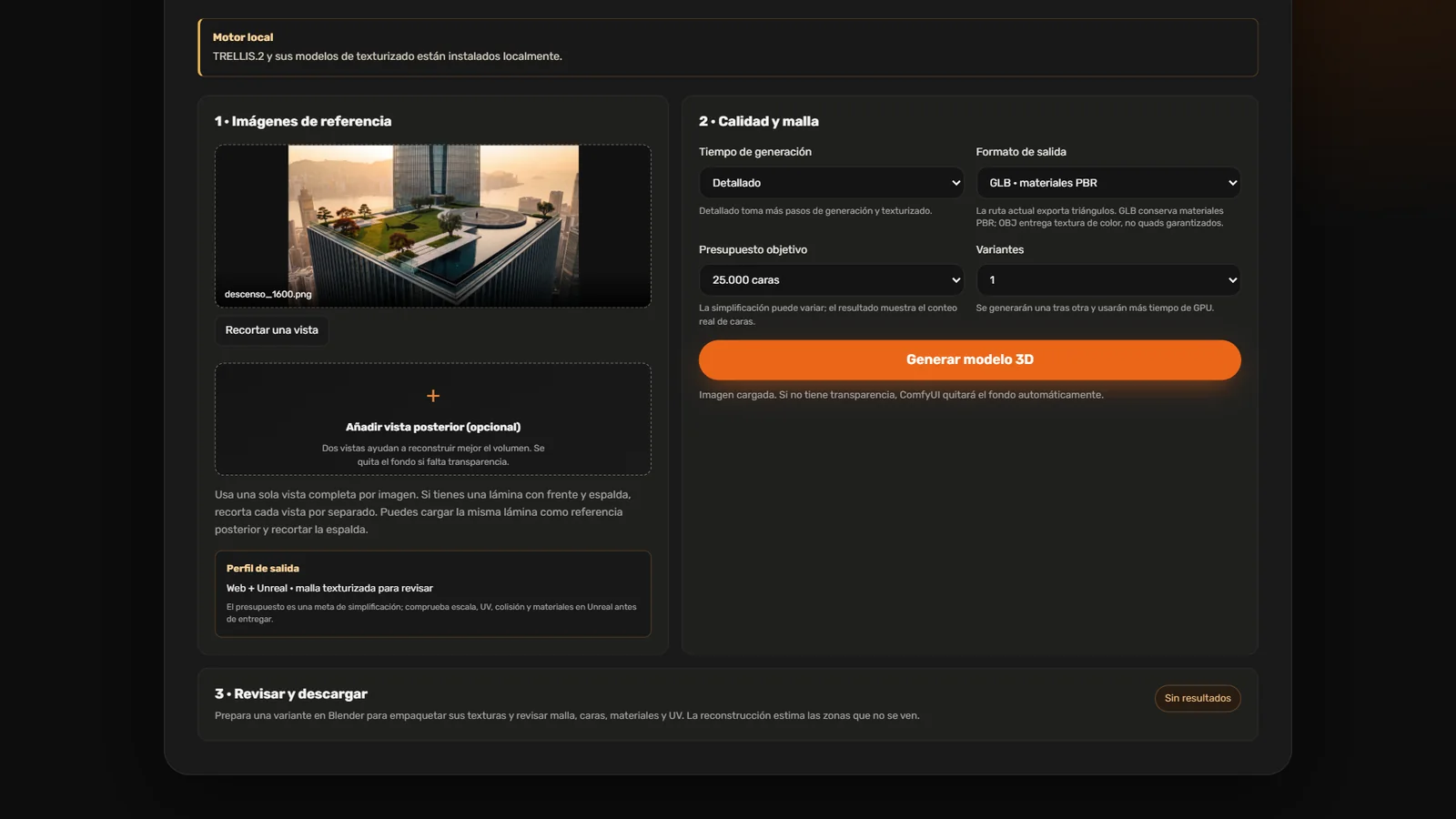
04 · 3DImage to 3D model

From one or two views to a model with PBR textures, to review in Blender and take to Unreal Engine or the web.

  • GLB or OBJ, with a face budget
  • The mesh needs review: scale, UVs and topology
Works today

AlwaysLibrary and projects

All your images and videos in one place, as a gallery or a list, with favorites and projects.

  • Each result records its workflow, models and parameters
Works today

AlwaysSpanish and English

The whole interface switches language with one click, with help at every step.

  • Contextual help in every tool

What’s coming

Experimental

Strict light preservation

After an edit, it restores your image’s light, color and time of day. In testing.

Coming soon

Quadremy Lab AI

Today it only organizes your references by tags. It doesn’t train custom styles yet.

Experimental

Spatial lab

Spatial reconstruction from a video (4DGS). For now, internal testing only.

Coming soon

Installer and updates

An installer for your PC and automatic updates, before access opens.

Under study

Cards with less memory

Today we test it on a 32 GB RTX 5090. With 8 GB of video memory we can’t promise it will work.

Coming soon

Construction time-lapse

Construction progressing to your final design. It’s in the app, but it doesn’t always end on your design yet.

Video

From render to clip,
workflow by workflow.

Everything is generated on your PC with a local video engine. Tests used short clips; long clips are not certified yet.

Works today

Image to video

In a render or a photo → Out a shot with camera motion

See details
  • Load an image and describe the camera and the motion.
  • Choose 2 s (preview) or 5 s, and automatic, horizontal 16:9 or vertical 9:16 format.
  • You can add an end frame to set where the shot ends (in testing: the path between two very different images can vary).
  • Limit: it's a single shot. Check that the geometry stays stable before delivering it.
Works today

Day to night

In a daytime image → Out a continuous transition into night

See details
  • Quadremy Studio creates the night version of the same image and animates day turning into night with a locked camera.
  • You can add lighting notes.
  • The result is delivered at 1080p, vertical or horizontal.
  • Limit: review the night image before using it; lights and reflections are a proposal.
Works today

Enhance video to 1080p or 4K

In a clip from Quadremy Studio or your own → Out the same clip at 1080p or 4K

See details
  • Processes the clip in segments with SeedVR2, keeping the audio and aspect ratio.
  • Recommended: generate at 5 s, review, and only then enhance.
  • Limit: 4K is the file size. From a small clip, fine detail is reconstructed and may contain inferences.
Beta

Clay or wireframe guide video

In a clay or wireframe clip → Out a video that follows that motion

See details
  • Upload an MP4, MOV or WEBM and describe the look you want.
  • The guide clip sets the camera path and pace.
  • Limit: the guide clip mainly controls motion; materials and some architectural details may change.
Beta

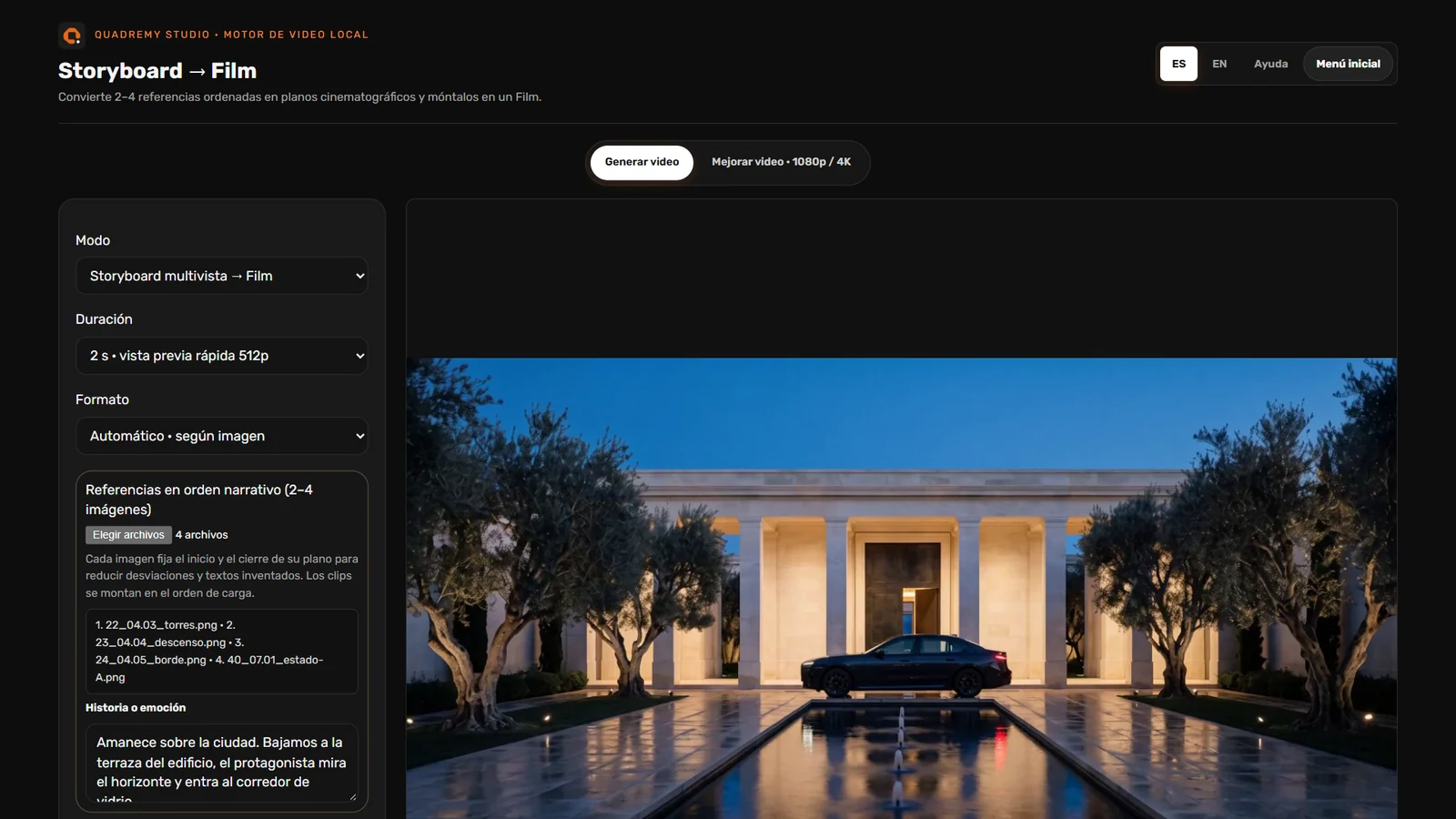
Storyboard to Film

In 2 to 4 images in order → Out a Film with one shot per image

See details
  • Load the views in story order (for example wide, marina, entrance and interior) and write the story or mood.
  • Quadremy Studio generates one shot per image and edits them into a single video.
  • Real test: 4 shots of 5 s, a 20 s Film at 1344 × 768 in about 8 minutes on an RTX 5090.
  • Limit: each shot starts true to its image, but toward the end it can drift from the reference or invent details, even signs. Review every shot before delivery.
Coming soon

Construction time-lapse

In the approved final design → Out construction progressing to that design

See details
  • It's in the app, but we don't offer it yet: in our tests the video starts on the final design and ends on a different tower.
  • Once the construction always ends on your design, it moves to Beta.
Inside the app

This is Quadremy Studio.

Inicio de Quadremy Studio: crear la imagen base y refinarla
Espacio de trabajo de Quadremy Studio con el comparador antes y después
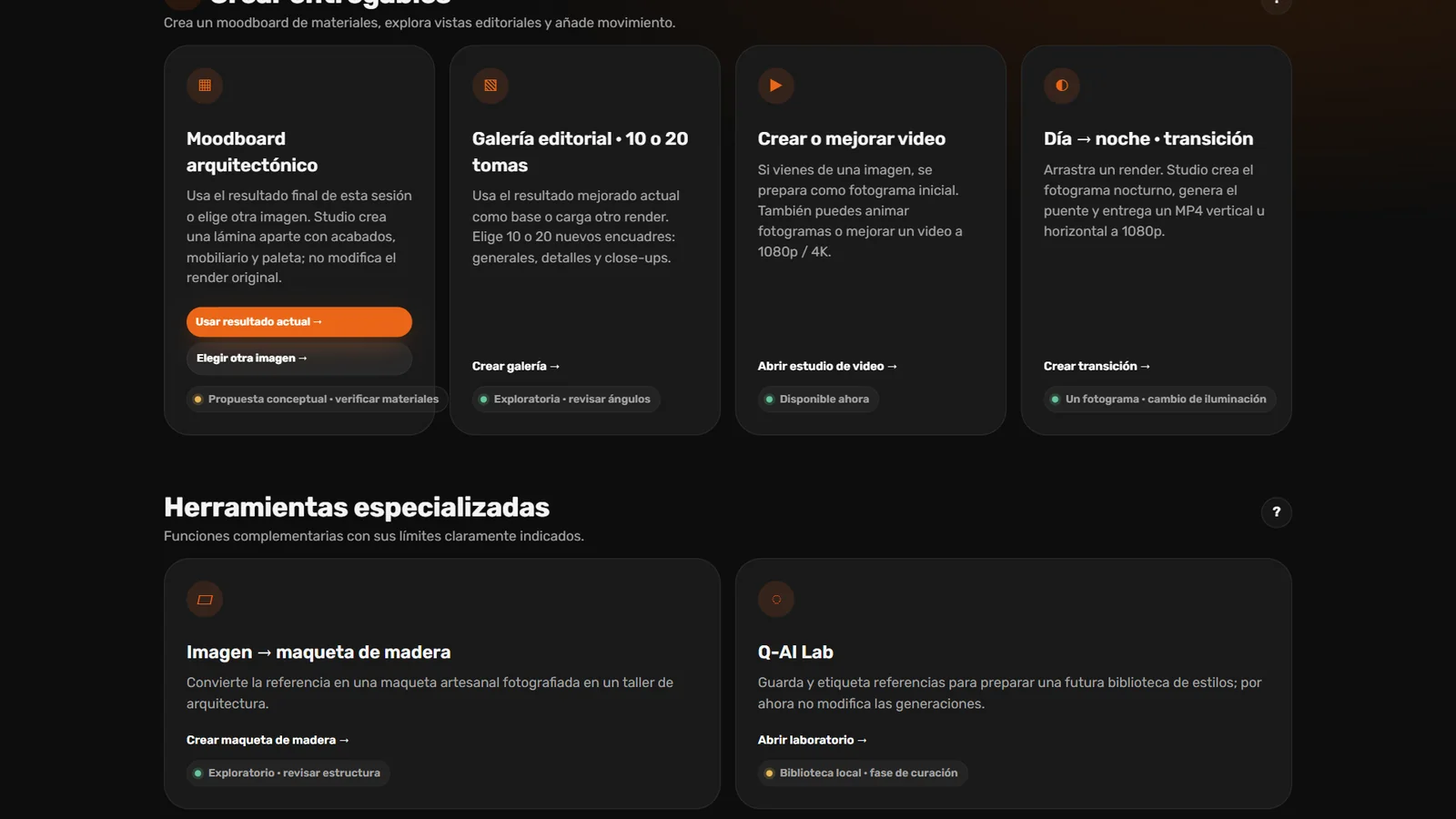
Entregables y herramientas especializadas de Quadremy Studio
Biblioteca de Quadremy Studio filtrada por proyecto
Estudio de video de Quadremy Studio: fotograma inicial y final
Storyboard a Film en Quadremy Studio: referencias en orden y la historia
Panel de imagen a modelo 3D de Quadremy Studio
How Quadremy Studio thinks

Fidelity first.
Always reviewable.

The architecture is respected

The Fidelity preset is the baseline: it keeps facades, openings and proportions. The more creative presets are used when needed, not by default.

Local by default

Your files and the models work on your computer. No cloud in between and no credits to burn.

You approve every change

You compare, zoom in and decide. Local changes always go through a mask you choose.

Everything is recorded

Each result stores which workflow, models and parameters produced it, so you can repeat or explain it.

What Quadremy Studio doesn't do

  • It doesn't certify hands, faces, text or materials: the final review is yours.
  • “4K” describes the size of the delivered image, not four times more invented detail.
  • Exploratory and experimental features are labeled as such in the app: they're proposals, not guaranteed deliverables.
Who it's for

Built for studios
with a powerful PC.

Quadremy Studio makes the most of a high-end GPU. In return, you pay no subscriptions or credits: what you generate has no per-image cost.

Tested onWindows 11, 32 GB NVIDIA RTX 5090 and 64 GB of RAM.
EngineComfyUI (Comfy Desktop) on the same PC. Quadremy Studio opens in your browser, locally.
ModelsSeedVR2, FLUX.2 Klein, Qwen Image Edit, SDXL with ControlNet and TRELLIS.2, plus a local video engine. Over 60 GB of disk space.
Final requirementsMinimums will be published before launch. With 8 GB of video memory we can’t promise it will work.
FAQ

What you should know.

When is Quadremy Studio coming out?

It’s not out yet: it’s in development and we use it on our own projects. People on the waitlist are the first to hear the date, price and terms.

Can I buy or download it now?

Not yet. There is no public download or sale. When early access opens, we’ll email you.

Is it a subscription?

No. The plan is a one-time payment for the app. It runs on your PC, so there are no credits and no cost per image.

Do I need to know how to use ComfyUI?

Not to use Quadremy Studio: you choose the workflow and drag in your image. ComfyUI has to be installed because it's the engine that does the work.

Does it work on a laptop or a Mac?

It is designed for Windows with a powerful NVIDIA graphics card. Today it is tested on a 32 GB RTX 5090; minimum requirements will be published before launch.

Are my images uploaded to any server?

No. Processing is local: your files stay on your computer.

Are the videos on this page retouched?

No. They are screen recordings of the development build, using our own material. We only sped up the waiting times.

How is it different from Q-Splats?

Q-Splats is the Gaussian Splatting plugin for Blender, Unreal Engine and 3ds Max. Quadremy Studio is the AI app for images, video and 3D. They're different products.

Waitlist

Be among the first to use Quadremy Studio.

Leave your email and I’ll let you know when early access opens, with the launch price. No spam.

Quadremy waitlist